Hello!
My name is Parker Prater. I live in Kernersville with my husband, Shawn, our four children, and our two dogs—Winnie and Sonny. We’ll be celebrating our first wedding anniversary this October. As a family, we love to travel when we can and cherish making memories together. I’m creative and resourceful, always looking for ways to bring more beauty and meaning into everyday life, though I’ll admit I can be a bit of a perfectionist. I enjoy working with my hands, finding natural and simple solutions for my home and the things we use daily. My faith is central to who I am and guides me to focus on what’s good, purposeful, and lasting.
That sense of purpose carries into my role as a mom of four — three sons and one daughter. My youngest two boys, Foster and Nolan, are at H.H.E., while my older son, Bennett, is in the JROTC program at Rockingham County High School. My oldest child and only daughter, Alaina, just graduated from college this summer. My path into web design began after my late husband, who was a network engineer, passed away when our youngest was a baby. At that time, I was a stay-at-home mom, but I knew I needed to find a career that would allow me to support my family from home while still homeschooling my children, as I felt the Lord leading me to do.
I first began by managing a friend’s social media accounts for her business. I quickly realized that while I struggled with the graphic design aspect, I enjoyed it far more than writing the communication content. I also knew there had to be rules and structure behind design that I hadn’t yet learned. Around that time, as I was helping my daughter navigate starting college, I discovered the fully online graphic design program at Wake Tech in Raleigh. Less than a month later, I was a full-time student.
During my second semester, I took a required coding class and quickly realized how much I excelled at the technical aspects of design. That discovery led me to research their Web and UX Design program. By my third semester, I was taking overlapping courses between the two programs and ultimately decided to make the switch. Through that process, I learned that stepping outside my comfort zone often leads to the greatest personal growth.
Along the way, I’ve grown passionate about accessibility — something that matters to me both personally and professionally. My oldest son has Down syndrome, and I’ve learned that everyone faces challenges, big or small, that affect how they experience the world around them, including technology. It’s incredibly rewarding to know that I can help reduce that burden by creating solutions that make life easier for others. Coding also lets me combine creativity with technical skills, and I love that the computer can be a tool for artistic expression even for those of us who don’t paint or play instruments.
My Family
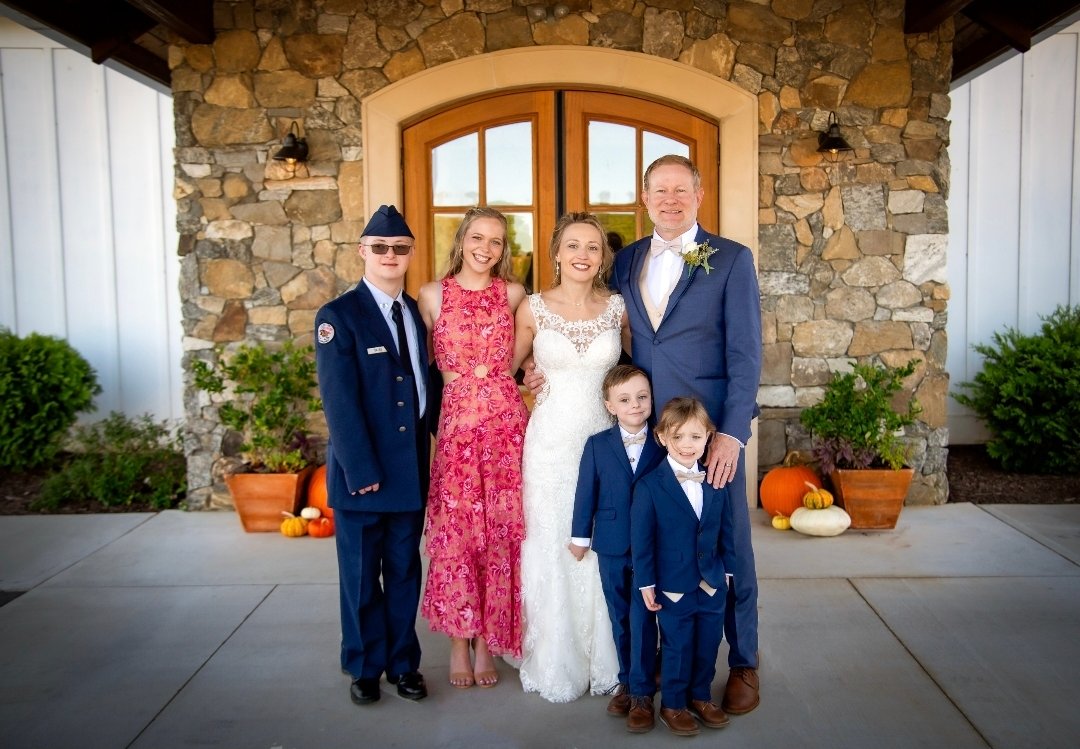
Left to Right: Bennett, Alaina, Parker, Nolan, Foster, and Shawn
Fun Facts
- I love coffee.
- I enjoy metal detecting (aka “dirt fishing”).
- Weekends often involve preparing our land as we plan to build a home.
- I absolutely love expressive graphic t-shirts.
Current Goals
- Finish certifications and my degree (about six classes to go).
- Continue to improve my health as I learn to navigate a complex medical diet.
- Learn new AI features in VS Code and how they fit into coding.
- Learn how to teach while helping you learn to code.
Code is Art
That does something!
Tools & Inspiration
- Figma is a design app for planning and prototyping websites with a team.
- Canva is an easy tool for making graphics and layouts for web projects.
- ChatGPT is an AI helper that explains code, answers questions, and gives ideas.
- Pexels offers free stock photos and videos you can use to improve websites.
- Start Bootstrap gives ready-to-use website templates built with Bootstrap.
- Avada is a popular WordPress theme that shows how prebuilt designs are used.
- WebAIM teaches about web accessibility and provides tools to test your site.
- YouTube has tutorials and demos that help you learn coding and web design.
- W3C writes the official rules for HTML, CSS, and accessibility on the web.
- W3Schools has simple lessons and examples for learning HTML, CSS, and more.
Advice to Students
Coding is a lot of troubleshooting. Try first, look things up, and keep calm — that persistence is a superpower. At some point, if you continue long enough, you will lose a large chunk of work (or even all of it) due to a mistake, a crash, or a sync issue. It’s painful and frustrating, but you’ll learn more from that moment than from any chapter in a book. We’ll build good habits to reduce risk (saving, backups, versioning), and I’m here to help when you hit a wall.
- Use the “edit → save → refresh” cycle — small changes, check results often.
- Google is a skill. Try searching your exact error or question.
- When stuck, explain the problem out loud or in writing — clarity helps.
- Protect your work: save often and keep copies (USB + computer).
Contact & Availability
The best times to reach me for detailed coding assistance, including debugging or more complex questions, are between 7:30–9:00 AM and after 8:00 PM.
For general or quick questions, I’m usually available throughout the day and will do my best to respond within an hour or two. For quick questions, you can send a text, while more complex issues should go through email. To make our time more effective, please include a short description of what you’ve already tried along with a screenshot when possible. I promise to be patient as you learn to code, and I appreciate your patience as I learn to share my passion for Web Design.